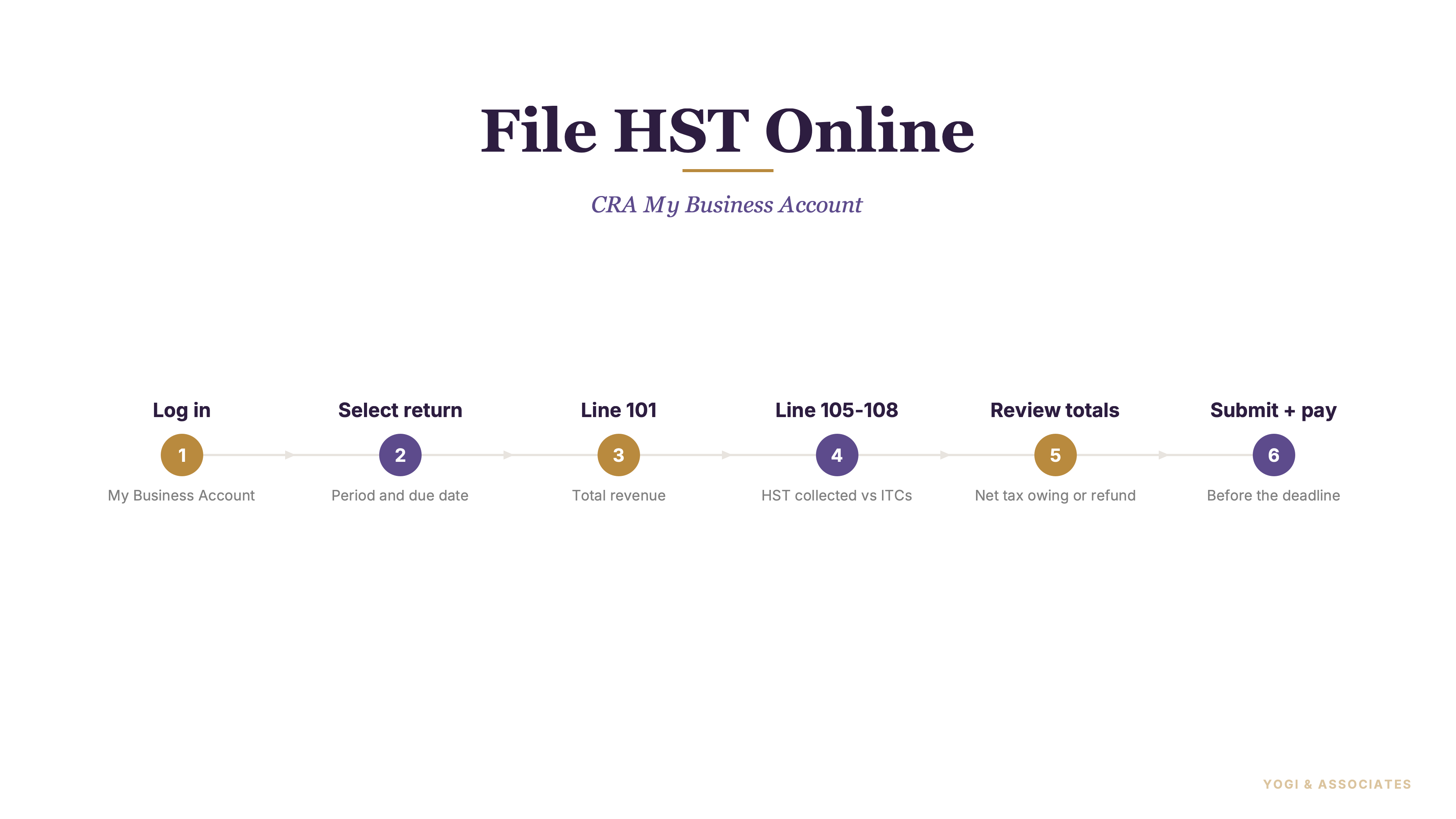
1. What each CRA filing tool actually is
Most Ontario small business owners file their own HST at least once before handing it off, and the CRA portal is where it starts. My Business Account is CRA's main business dashboard — one login that covers GST/HST, payroll, corporation income tax, excise, and more. Think of it as the house.
GST/HST NETFILE is the filing service inside the house. You can reach it directly through My Business Account (no access code needed) or stand-alone on CRA's website with a 4-digit access code from your personalized return. Same filing, two doors.
Owners waste time when they treat these as interchangeable names. They're not — the access code requirement alone creates half the friction. Our GST/HST guide is the bigger-picture map if you want the whole filing system in one place.
2. Getting logged in before deadline week
CRA lets you sign in with a CRA user ID and password or with a Sign-In Partner (your bank). If your online banking login already works, that's usually the faster path.
First-time access is where owners get slowed down. Adding the BN and answering the identity questions is the part that should happen before filing day, not during it — CRA sometimes asks for details from a prior return that's already been filed and processed, and that can take a few days to confirm.
Once the account is set up and the BN is linked, the filing screen itself is the easy part. Don't wait until deadline week to test the login.
3. What to gather before you click file
Start with the return period and the totals for that period: sales, GST/HST collected, ITCs, and any adjustments that belong on the return.
If you're filing outside your CRA account, keep the personalized return nearby for the 4-digit access code. Inside My Business Account, the access code isn't required.
Sort the period first, the numbers second. Our HST filing frequency guide helps if you're still unsure which return period should be open right now.
4. Filling the return without guessing
Start with line 101: total sales and other revenues for the period. Make sure this number agrees with your books before you enter anything else — once it's locked in, every downstream line reconciles against it.
Line 105 is GST/HST collected and adjustments for the period. This is where people mix up gross sales logic with tax logic. Line 101 is revenue. Line 105 is tax on that revenue. They're related but not interchangeable, and owners sometimes enter the same number in both fields.
Line discipline beats filing speed every time. If your sales setup is still shaky, read our GST/HST registration guide before you keep pushing through the return.
5. Entering ITCs and reading the result
Line 108 is total ITCs and adjustments that reduce net tax. Line 109 is the net tax result after line 108 is subtracted from line 105.
Line 108 is where self-filed returns drift. Owners claim expenses without checking the actual ITC rule — missing supplier numbers, mixed-use percentages that never got carved out, meals at full rate instead of 50%, and claims filed outside the 4-year window. Every one of those gets disallowed under review.
The return then moves through later credit and debit lines, including line 113A or 113B. Clean ITC support fixes most return problems before they start. Our ITC guide is the right deep dive if line 108 still feels fuzzy.
6. What happens after you submit
After you file, CRA treats the result as either a refund or a balance owing. If your net tax is negative, CRA normally issues refunds within 4 weeks of receiving the return.
Set up direct deposit if you expect money back — it's the fastest route. Watch out: CRA can hold a GST/HST refund until all required returns are filed and outstanding amounts are dealt with. One late return elsewhere in your account can freeze a refund you're counting on.
Read the result screen slowly. It's the one moment you can still catch a bad number before it becomes a reassessment. Our GST/HST mistakes guide covers the cleanup side if the filed numbers already look wrong.
7. Deadlines and payment options
Filing online doesn't change the due date. Monthly and quarterly filers are due one month after the end of the reporting period. Most annual filers are due three months after fiscal year-end.
Represent a Client is a separate CRA portal for accountants and bookkeepers to file on a client's behalf after being authorized. It's the professional route, not owner self-service. A business can authorize a representative through My Business Account or by sending Form AUT-01.
Decide payment before you hit submit. CRA accepts pre-authorized debit, online banking, debit through My Payment, and third-party credit card processors for a fee. Our HST filing service makes the most sense once you're tired of piecing all this together yourself every reporting period.
Want a second set of eyes on the return before you hit submit? We review self-filed HST returns for GTA owners — line 101, line 108, the ITC support behind it, and the result screen — usually in under an hour. Much cheaper than fixing it after CRA bounces it.
Book a Free Consultation