1. Notice the warning signs early
For growing Ontario small businesses, the first warning sign is not usually one giant disaster. It is usually five smaller annoyances happening every month.
You add a second bank account, then payroll, then HST, then customer invoices, then a few unpaid bills. But the spreadsheet still looks like it did when the business had one account and ten transactions a month.
The real tipping points are these: growing transaction volume, A/R aging, several revenue streams, year-end taking forever, formulas breaking, lost rows, and your accountant telling you the books need cleanup again. So if that sounds familiar, start with our bookkeeping guide for Canadian small businesses, because the issue is no longer just data entry.
2. Know where spreadsheets break down
Spreadsheets are flexible, cheap, and easy to start. But they get fragile once the business has moving parts.
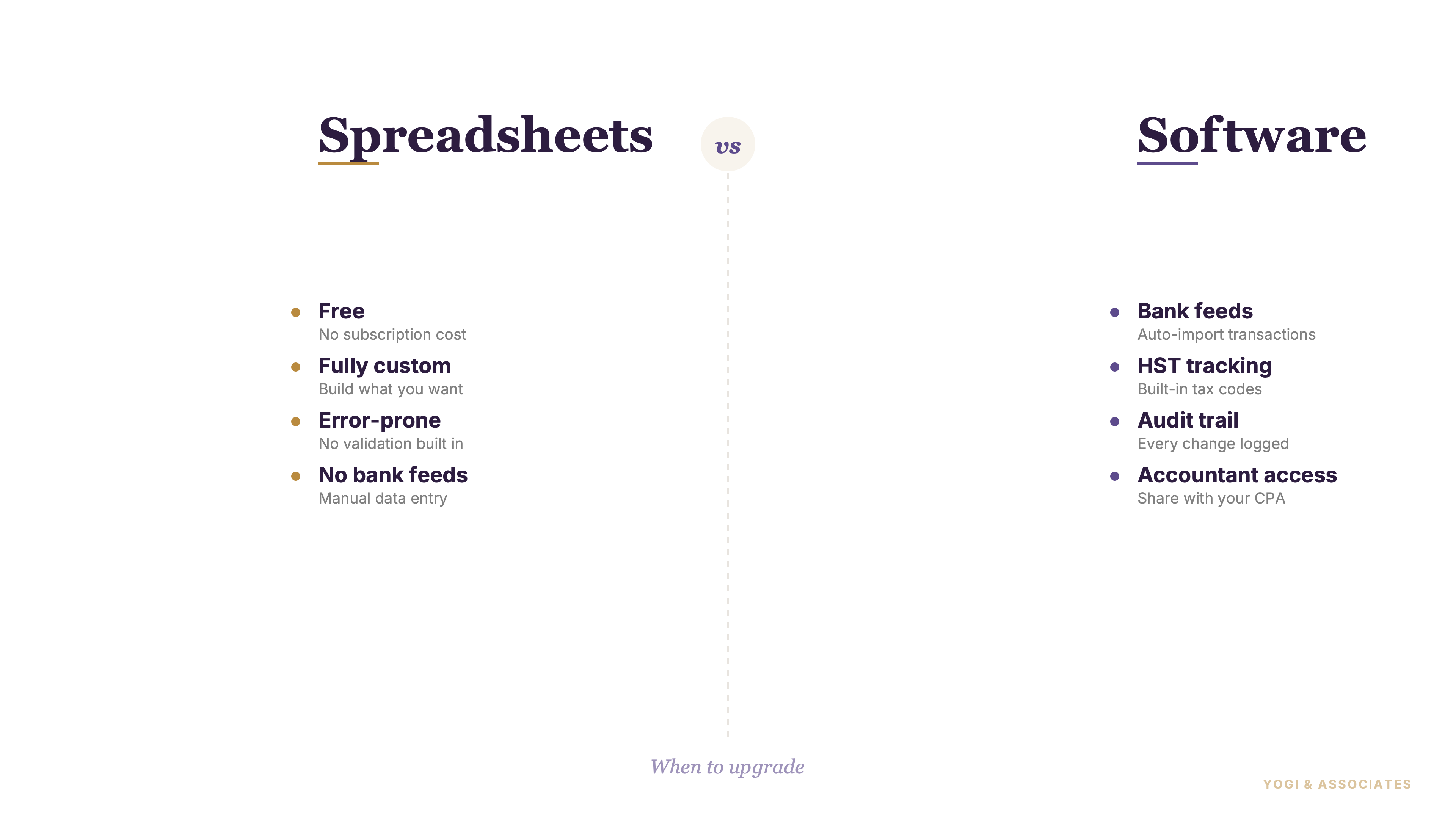
Most spreadsheets have no audit trail (a log of who changed what and when, so you can prove the books haven't been tampered with — accounting software has it, spreadsheets don't). They also lack double-entry (the bookkeeping rule that every transaction has two sides — every debit has a credit — built into accounting software but missing from most spreadsheets), which is why mistakes can sit there quietly for months.
Owners also underestimate manual reconciliation. So every month you are matching deposits, withdrawals, and outstanding items by hand instead of using a better process like the one in our bank reconciliation walkthrough. Plus one deleted formula can throw off the whole file with no warning.
3. Understand what software actually fixes
Real accounting software does not make bookkeeping effortless. It does make the books harder to break.
A good system gives you bank feed (an automatic connection from your bank account into your accounting software so transactions show up daily without typing), built-in reports, HST tracking, customer and vendor records, and better user access control. And because the books run inside accounting logic, the file pushes back when something does not balance.
That guardrail matters more than the fancy features. But software is not magic either. You still need clean categories, clean opening balances, and someone reviewing the numbers with basic discipline.
4. Pick the right Canadian-friendly option
There is no single winner for every business. Most owners should choose the tool that matches their size and tolerance for bookkeeping, not the one with the loudest ads.
- QuickBooks Online is still the default pick for many Canadian small businesses. QuickBooks says it is cloud-based, offers multiple plans, connects bank and credit card accounts, tracks tax categories, and has a payroll add-on for Canada. Source: QuickBooks Canada accounting software and QuickBooks Canada payroll.
- Xero is a strong cloud option if you want a cleaner interface and app-heavy workflow. Xero says Canadian users can connect bank accounts, generate GST and HST reports, and connect payroll apps through its partner marketplace. Source: Xero Canada accounting software, Xero bank feeds, and Xero payroll apps.
- Sage 50 Canada fits businesses that still prefer a more traditional setup. Sage says Sage 50 combines desktop accounting with cloud connectivity and has Canadian plans built around small-business needs. Source: Sage 50 Canada.
- Wave fits the smallest operations and freelancers best. Wave says its Starter Plan is free and includes basic accounting and invoicing, while payroll is a paid feature in Canada. Source: Wave free plan and Wave payroll Canada.
So if you already know you are leaning QuickBooks, our QuickBooks Online setup guide is the natural next step.
5. Migrate the right data, not everything
Most owners try to bring too much into the new file. That is one of the easiest ways to make a clean switch messy.
Bring your chart of accounts, customer list, vendor list, and opening balances as of the switch date. And if you can bring enough current-year history for useful comparison, great.
But do not drag over every transaction from older years, every formula, or old spreadsheet macros. Those do not translate cleanly, and they usually add work without adding value. So if the old books are already behind or inconsistent, use a cleanup process first, or get help through our catch-up bookkeeping service before migration day.
6. Switch at the right time in the year
The best switch date is boring. In our view, that is exactly what you want.
The cleanest timing is the start of a fiscal year or the start of a quarter. So January 1, April 1, July 1, or October 1 usually makes life easier because reconciliations, HST periods, and reporting cut off neatly.
But a mid-period change creates extra pain fast. You have split reports, half-done reconciliations, and more opening-balance mistakes. Owners should wait a few weeks for a cleaner date rather than rush into the middle of a month just because they are frustrated.
7. Expect the first month to be annoying
The first month after switching almost always feels slower, not faster. That does not mean the move was wrong.
You will spend extra time fixing categories, checking bank rules, learning the screens, confirming opening balances, and sorting out the first reconciliation. And if payroll or HST settings were rushed, you will notice it immediately.
Owners should plan for one heavier month, then judge the switch after month two or three. So do not quit after week one. In most cases, the time spent drops below spreadsheet bookkeeping pretty quickly once the file is set up properly.
If your spreadsheet system now feels heavier every month, that is usually the sign. We can help you clean up the books and move into software without dragging the chaos forward.
Book a Free Consultation